计算机机房全域数据管控:SNMP读取温湿度变送器本地历史数据

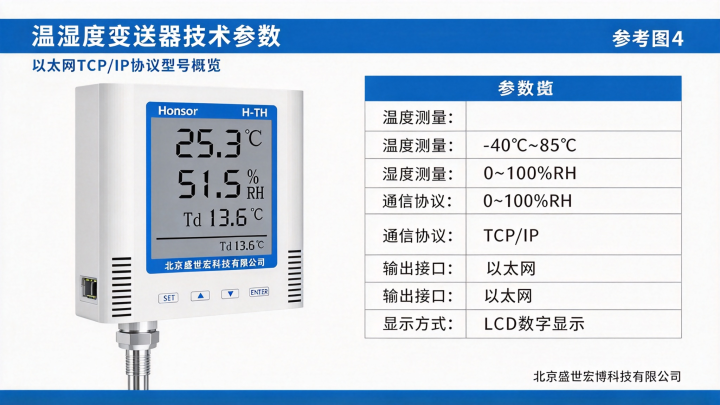
计算机机房动环二次开发:SNMP读取以太网温湿度变送器历史记录

0
一、动环系统二次开发的现实约束
计算机机房(数据中心)的动环系统(动力环境监控系统)通常采购自专业厂商,具备统一的监控平台、告警引擎、报表模块。但在实际运维中,标准动环系统往往面临两个"覆盖不到":
新增监测点位:机房扩建、机柜密度调整,需要接入新型号的温湿度变送器,而动环厂商的驱动库尚未支持该型号
历史数据深度分析:标准动环只提供实时值展示和简单趋势图,运维团队需要更细粒度的历史记录用于容量规划、热点分析和能耗优化
二次开发的核心诉求是:在不替换现有动环平台的前提下,通过标准协议(SNMP)直接读取变送器的历史记录,将数据汇入自有分析系统。
这比"实时值读取"复杂得多——SNMP协议本身是为实时状态查询设计的,历史记录读取需要解决数据组织、分页查询、时间范围筛选、存储容量协商等一系列问题。
添加图片注释,不超过 140 字(可选)
二、方案总体思路
┌─────────────────────────────────────────────────────────────────────┐ │ 机房现场 │ │ │ │ ┌──────────────┐ ┌──────────────┐ ┌──────────────┐ │ │ │ SNMP温湿度 │ │ SNMP温湿度 │ │ SNMP温湿度 │ │ │ │ 变送器 #1 │ │ 变送器 #2 │ │ 变送器 #N │ │ │ │ │ │ │ │ │ │ │ │ 内置存储 │ │ 内置存储 │ │ 内置存储 │ │ │ │ ~7天历史 │ │ ~7天历史 │ │ ~7天历史 │ │ │ └──────┬───────┘ └──────┬───────┘ └──────┬───────┘ │ │ │ │ │ │ │ └──────────────────┼──────────────────┘ │ │ │ SNMP v2c/v3 │ │ ┌──────▼───────┐ │ │ │ 接入交换机 │ │ │ └──────┬───────┘ │ └────────────────────────────┼────────────────────────────────────────┘ │ ┌────────────────────────────┼────────────────────────────────────────┐ │ 动环监控网络 │ │ │ │ │ │ ┌─────────────────────────▼───────────────────────────────────┐ │ │ │ 标准动环平台(只读实时值,通过厂商驱动) │ │ │ │ - 实时显示、阈值告警、基础报表 │ │ │ └─────────────────────────────────────────────────────────────┘ │ │ │ │ ┌─────────────────────────────────────────────────────────────┐ │ │ │ 二次开发采集程序(SNMP历史记录读取) │ │ │ │ ┌───────────────────────────────────────────────────────┐ │ │ │ │ │ 1. SNMP Walk 发现设备MIB树结构 │ │ │ │ │ │ 2. 查询设备存储信息(容量、时间范围) │ │ │ │ │ │ 3. 按时间范围分页读取历史记录 │ │ │ │ │ │ 4. 数据解析、去重、写入时序数据库 │ │ │ │ │ └───────────────────────────────────────────────────────┘ │ │ │ └───────────────────────────┬─────────────────────────────────┘ │ │ │ │ │ ┌───────────────────────────▼─────────────────────────────────┐ │ │ │ 分析平台(自有系统) │ │ │ │ - 热点分析、容量规划、PUE关联分析 │ │ │ │ - 自定义报表、数据导出 │ │ │ └─────────────────────────────────────────────────────────────┘ │ └─────────────────────────────────────────────────────────────────────┘ 复制
设计原则:
不干扰标准动环:二次开发采集走独立的SNMP Community或只读用户,不影响动环平台的实时轮询
历史记录与实时值分离:实时值由动环平台负责,历史记录由二次开发程序负责
设备侧存储是数据源:所有历史数据以变送器本地存储为准,采集程序是消费者
0
三、MIB设计:让SNMP承载历史记录
3.1 为什么SNMP读历史记录是"非标"操作
标准SNMP MIB(如ENTITY-SENSOR-MIB、UPS-MIB)通常只定义实时值:
# 标准温湿度MIB示例 iso(1).org(3).dod(6).internet(1).mgmt(2).mib-2(1). entitySensor(99).entitySensorObjects(1). entitySensorValue(4).1 = 235 # 温度 23.5℃ 复制
历史记录需要按时间索引的数据表,标准MIB没有定义。因此需要在私有MIB中扩展。
3.2 私有MIB定义
-- 企业私有MIB: 1.3.6.1.4.1.XXXXXX (企业号) -- 温湿度历史记录扩展 ENV-HISTORY-MIB DEFINITIONS ::= BEGIN IMPORTS OBJECT-TYPE, Integer32, Unsigned32, Counter64 FROM SNMPv2-SMI MODULE-IDENTITY FROM SNMPv2-SMI TEXTUAL-CONVENTION FROM SNMPv2-TC; envHistory MODULE-IDENTITY LAST-UPDATED "202501150000Z" ORGANIZATION "EnvMonitor Inc." DESCRIPTION "温湿度历史记录私有MIB" ::= { enterprises XXXXXX 1 } -- ============================================================ -- 存储信息组 -- ============================================================ storageInfo OBJECT IDENTIFIER ::= { envHistory 1 } totalCapacity OBJECT-TYPE SYNTAX Unsigned32 UNITS "records" MAX-ACCESS read-only DESCRIPTION "历史记录总容量(条)" ::= { storageInfo 1 } usedCapacity OBJECT-TYPE SYNTAX Unsigned32 UNITS "records" MAX-ACCESS read-only DESCRIPTION "已使用容量(条)" ::= { storageInfo 2 } oldestTimestamp OBJECT-TYPE SYNTAX Unsigned32 UNITS "unix timestamp" MAX-ACCESS read-only DESCRIPTION "最旧记录的时间戳" ::= { storageInfo 3 } newestTimestamp OBJECT-TYPE SYNTAX Unsigned32 UNITS "unix timestamp" MAX-ACCESS read-only DESCRIPTION "最新记录的时间戳" ::= { storageInfo 4 } recordInterval OBJECT-TYPE SYNTAX Unsigned32 UNITS "seconds" MAX-ACCESS read-only DESCRIPTION "记录间隔(秒)" ::= { storageInfo 5 } -- ============================================================ -- 查询控制组 -- ============================================================ queryControl OBJECT IDENTIFIER ::= { envHistory 2 } queryStartTime OBJECT-TYPE SYNTAX Unsigned32 UNITS "unix timestamp" MAX-ACCESS read-write DESCRIPTION "查询起始时间" ::= { queryControl 1 } queryEndTime OBJECT-TYPE SYNTAX Unsigned32 UNITS "unix timestamp" MAX-ACCESS read-write DESCRIPTION "查询结束时间" ::= { queryControl 2 } queryMaxRecords OBJECT-TYPE SYNTAX Unsigned32 MAX-ACCESS read-write DESCRIPTION "单次最大返回记录数(默认50)" ::= { queryControl 3 } queryStatus OBJECT-TYPE SYNTAX INTEGER { idle(0), preparing(1), ready(2), error(3) } MAX-ACCESS read-only DESCRIPTION "查询状态" ::= { queryControl 4 } queryTrigger OBJECT-TYPE SYNTAX INTEGER { trigger(1) } MAX-ACCESS read-write DESCRIPTION "写入1触发查询" ::= { queryControl 5 } queryNextStart OBJECT-TYPE SYNTAX Unsigned32 UNITS "unix timestamp" MAX-ACCESS read-only DESCRIPTION "下一批查询的起始时间(用于分页)" ::= { queryControl 6 } -- ============================================================ -- 历史数据表 -- ============================================================ historyTable OBJECT-TYPE SYNTAX SEQUENCE OF HistoryEntry MAX-ACCESS not-accessible DESCRIPTION "历史记录表" ::= { envHistory 3 } historyEntry OBJECT-TYPE SYNTAX HistoryEntry MAX-ACCESS not-accessible DESCRIPTION "历史记录条目" INDEX { historyIndex } ::= { historyTable 1 } HistoryEntry ::= SEQUENCE { historyIndex Integer32, historyTimestamp Unsigned32, historyTemperature Integer32, -- 0.1℃为单位 historyHumidity Integer32, -- 0.1%RH为单位 historyStatus Unsigned32 } historyIndex OBJECT-TYPE SYNTAX Integer32 (1..100) MAX-ACCESS not-accessible DESCRIPTION "表行索引" ::= { historyEntry 1 } historyTimestamp OBJECT-TYPE SYNTAX Unsigned32 MAX-ACCESS read-only DESCRIPTION "记录时间戳" ::= { historyEntry 2 } historyTemperature OBJECT-TYPE SYNTAX Integer32 MAX-ACCESS read-only DESCRIPTION "温度值,0.1℃为单位" ::= { historyEntry 3 } historyHumidity OBJECT-TYPE SYNTAX Integer32 MAX-ACCESS read-only DESCRIPTION "湿度值,0.1%RH为单位" ::= { historyEntry 4 } historyStatus OBJECT-TYPE SYNTAX Unsigned32 MAX-ACCESS read-only DESCRIPTION "状态字" ::= { historyEntry 5 } END 复制
3.3 MIB树结构总览
1.3.6.1.4.1.XXXXXX.1 (envHistory) ├── 1.1 totalCapacity (存储总容量) ├── 1.2 usedCapacity (已用容量) ├── 1.3 oldestTimestamp (最旧时间戳) ├── 1.4 newestTimestamp (最新时间戳) ├── 1.5 recordInterval (记录间隔) ├── 2.1 queryStartTime (查询起始时间) ├── 2.2 queryEndTime (查询结束时间) ├── 2.3 queryMaxRecords (单次最大记录数) ├── 2.4 queryStatus (查询状态) ├── 2.5 queryTrigger (查询触发) ├── 2.6 queryNextStart (下一批起始时间) └── 3.1 historyTable (历史数据表) └── 1..N (行) ├── 1 historyIndex ├── 2 historyTimestamp ├── 3 historyTemperature ├── 4 historyHumidity └── 5 historyStatus 复制
四、变送器固件实现
4.1 SNMP Agent中的历史记录处理
// snmp_history.c - SNMP历史记录模块 #include "snmpd.h" #include #define MAX_HISTORY_RECORDS 10000 #define MAX_QUERY_RECORDS 50 // 历史记录存储(Flash中的循环缓冲区) static env_record_t history_buf[MAX_HISTORY_RECORDS]; static uint32_t history_head = 0; // 最新记录位置 static uint32_t history_count = 0; // 当前记录数 // 查询参数 static uint32_t query_start = 0; static uint32_t query_end = 0; static uint32_t query_max = MAX_QUERY_RECORDS; static uint32_t query_status = 0; // 0=idle, 1=preparing, 2=ready, 3=error static uint32_t query_next_start = 0; // 查询缓存(存放当前查询结果) static env_record_t query_cache[MAX_QUERY_RECORDS]; static uint32_t query_cache_count = 0; // 写入历史记录(由采样任务调用) void history_record_write(float temp, float humi, uint16_t status) { env_record_t *rec = &history_buf[history_head]; rec->timestamp = (uint32_t)time(NULL); rec->temperature = (int16_t)(temp * 10); // 0.1℃为单位 rec->humidity = (int16_t)(humi * 10); // 0.1%RH为单位 rec->status = status; history_head = (history_head + 1) % MAX_HISTORY_RECORDS; if (history_count < MAX_HISTORY_RECORDS) { history_count++; } } // SNMP写操作回调:设置查询参数 int snmp_set_query_start(uint32_t value) { query_start = value; query_status = 1; // preparing return SNMP_ERR_NOERROR; } int snmp_set_query_end(uint32_t value) { query_end = value; return SNMP_ERR_NOERROR; } int snmp_set_query_max(uint32_t value) { if (value > MAX_QUERY_RECORDS) value = MAX_QUERY_RECORDS; query_max = value; return SNMP_ERR_NOERROR; } int snmp_set_query_trigger(uint32_t value) { if (value != 1) return SNMP_ERR_WRONGVALUE; // 执行查询 query_status = 1; // preparing // 在循环缓冲区中查找时间范围内的记录 uint32_t found = 0; uint32_t idx = (history_head + MAX_HISTORY_RECORDS - history_count) % MAX_HISTORY_RECORDS; query_cache_count = 0; query_next_start = query_end; for (uint32_t i = 0; i < history_count && found < history_count; i++) { env_record_t *rec = &history_buf[idx]; if (rec->timestamp >= query_start && rec->timestamp <= query_end) { if (query_cache_count < query_max) { query_cache[query_cache_count++] = *rec; if (rec->timestamp < query_next_start) { query_next_start = rec->timestamp + 1; } } } idx = (idx + 1) % MAX_HISTORY_RECORDS; found++; } query_status = query_cache_count > 0 ? 2 : 3; // ready or error return SNMP_ERR_NOERROR; } // SNMP读操作回调:读取历史表 int snmp_get_history(int column, int row, void *value, size_t *len) { if (row < 1 || row > query_cache_count) { return SNMP_ERR_NOSUCHINSTANCE; } env_record_t *rec = &query_cache[row - 1]; switch (column) { case 1: // historyIndex *(int32_t*)value = row; *len = sizeof(int32_t); break; case 2: // historyTimestamp *(uint32_t*)value = rec->timestamp; *len = sizeof(uint32_t); break; case 3: // historyTemperature *(int32_t*)value = rec->temperature; *len = sizeof(int32_t); break; case 4: // historyHumidity *(int32_t*)value = rec->humidity; *len = sizeof(int32_t); break; case 5: // historyStatus *(uint32_t*)value = rec->status; *len = sizeof(uint32_t); break; default: return SNMP_ERR_NOSUCHINSTANCE; } return SNMP_ERR_NOERROR; } 复制
4.2 固件侧注意事项
SNMP Table是"快照"语义:查询触发后,结果缓存在query_cache中,后续SNMP GetNext操作从缓存读取。如果在读取过程中有新数据写入,不影响当前查询结果。
分页通过queryNextStart实现:客户端读完一批后,用queryNextStart作为新的queryStartTime,再次触发查询。
OID编码:历史表行的OID格式为1.3.6.1.4.1.XXXXXX.1.3.1.1.{column}.{row},SNMP Walk会自动遍历所有行。
五、服务器端采集程序
5.1 Python实现(SNMP历史记录读取)
#!/usr/bin/env python3 """ snmp_history_collector.py 通过SNMP读取以太网温湿度变送器的历史记录 """ import time import logging from typing import List, Dict, Optional from pysnmp.hlapi import * from influxdb_client import InfluxDBClient, Point from datetime import datetime, timezone logging.basicConfig( level=logging.INFO, format='%(asctime)s [%(levelname)s] %(message)s' ) logger = logging.getLogger(__name__) # MIB OID定义 MIB_BASE = '1.3.6.1.4.1.XXXXXX.1' OID_STORAGE = { 'total_capacity': f'{MIB_BASE}.1.1.0', 'used_capacity': f'{MIB_BASE}.1.2.0', 'oldest_timestamp': f'{MIB_BASE}.1.3.0', 'newest_timestamp': f'{MIB_BASE}.1.4.0', 'record_interval': f'{MIB_BASE}.1.5.0', } OID_QUERY = { 'start_time': f'{MIB_BASE}.2.1.0', 'end_time': f'{MIB_BASE}.2.2.0', 'max_records': f'{MIB_BASE}.2.3.0', 'status': f'{MIB_BASE}.2.4.0', 'trigger': f'{MIB_BASE}.2.5.0', 'next_start': f'{MIB_BASE}.2.6.0', } OID_HISTORY_TABLE = f'{MIB_BASE}.3.1.1' # historyTable class SNMPHistoryCollector: def __init__(self, host: str, community: str = 'public', port: int = 161, influx_url: str = None): self.host = host self.community = community self.port = port self.influx_client = InfluxDBClient(url=influx_url, token='xxx') self.write_api = self.influx_client.write_api() def _snmp_get(self, oid: str): """SNMP GET操作""" iterator = getCmd( SnmpEngine(), CommunityData(self.community), UdpTransportTarget((self.host, self.port), timeout=3, retries=2), ContextData(), ObjectType(ObjectIdentity(oid)) ) errorIndication, errorStatus, errorIndex, varBinds = next(iterator) if errorIndication: raise Exception(f"SNMP error: {errorIndication}") if errorStatus: raise Exception(f"SNMP status: {errorStatus.prettyPrint()}") for varBind in varBinds: return varBind[1] def _snmp_set(self, oid: str, value: int): """SNMP SET操作""" iterator = setCmd( SnmpEngine(), CommunityData(self.community), UdpTransportTarget((self.host, self.port), timeout=3, retries=2), ContextData(), ObjectType(ObjectIdentity(oid), Integer(value)) ) errorIndication, errorStatus, errorIndex, varBinds = next(iterator) if errorIndication: raise Exception(f"SNMP SET error: {errorIndication}") if errorStatus: raise Exception(f"SNMP SET status: {errorStatus.prettyPrint()}") def _snmp_walk(self, oid: str) -> Dict[int, Dict[int, any]]: """SNMP Walk操作,返回解析后的表数据""" result = {} iterator = nextCmd( SnmpEngine(), CommunityData(self.community), UdpTransportTarget((self.host, self.port), timeout=5, retries=2), ContextData(), ObjectType(ObjectIdentity(oid)), lexicographicMode=False ) for errorIndication, errorStatus, errorIndex, varBinds in iterator: if errorIndication or errorStatus: break for varBind in varBinds: oid_str = str(varBind[0]) value = varBind[1] # 解析OID: ...column.row parts = oid_str.split('.') column = int(parts[-2]) row = int(parts[-1]) if row not in result: result[row] = {} result[row][column] = int(value) return result def get_storage_info(self) -> Dict: """获取设备存储信息""" info = {} for key, oid in OID_STORAGE.items(): info[key] = int(self._snmp_get(oid)) return info def query_history(self, start_ts: int, end_ts: int, max_records: int = 50) -> List[Dict]: """查询历史记录""" # 设置查询参数 self._snmp_set(OID_QUERY['start_time'], start_ts) self._snmp_set(OID_QUERY['end_time'], end_ts) self._snmp_set(OID_QUERY['max_records'], max_records) # 触发查询 self._snmp_set(OID_QUERY['trigger'], 1) # 等待查询完成 for _ in range(10): status = int(self._snmp_get(OID_QUERY['status'])) if status == 2: # ready break elif status == 3: # error raise Exception("Query failed on device") time.sleep(0.5) else: raise Exception("Query timeout") # 读取结果表 table_data = self._snmp_walk(OID_HISTORY_TABLE) records = [] for row, cols in sorted(table_data.items()): records.append({ 'timestamp': cols.get(2, 0), 'temperature': cols.get(3, 0) / 10.0, 'humidity': cols.get(4, 0) / 10.0, 'status': cols.get(5, 0), }) return records def collect_with_backfill(self, batch_hours: int = 1): """带补传的历史数据采集""" # 获取设备时间范围 storage = self.get_storage_info() oldest = storage['oldest_timestamp'] newest = storage['newest_timestamp'] logger.info(f"Device storage: oldest={oldest}, newest={newest}") # 从最旧记录开始,按批次读取 current_start = oldest while current_start < newest: current_end = min(current_start + batch_hours * 3600, newest) try: records = self.query_history( current_start, current_end, max_records=50 ) logger.info(f"Got {len(records)} records for " f"{datetime.fromtimestamp(current_start)} ~ " f"{datetime.fromtimestamp(current_end)}") # 写入数据库 for rec in records: point = Point("env_history") .tag("device", self.host) .field("temp_c", rec['temperature']) .field("humi_pct", rec['humidity']) .field("status", rec['status']) .time(datetime.fromtimestamp( rec['timestamp'], tz=timezone.utc)) self.write_api.write(bucket="env_data", org="org", record=point) # 获取下一批起始时间 next_start = int(self._snmp_get(OID_QUERY['next_start'])) current_start = next_start if next_start > current_start else current_end + 1 except Exception as e: logger.error(f"Query failed: {e}") time.sleep(5) def run_continuous(self, interval: int = 300): """持续运行:每interval秒采集一次最新数据""" while True: try: storage = self.get_storage_info() newest = storage['newest_timestamp'] # 读取最近interval秒的数据 start = newest - interval records = self.query_history(start, newest) for rec in records: logger.info(f"Record: {rec}") # 写入数据库... except Exception as e: logger.error(f"Collection error: {e}") time.sleep(interval) if __name__ == '__main__': collector = SNMPHistoryCollector( host='10.70.1.11', community='envmonitor_ro', influx_url='http://localhost:8086' ) # 执行一次全量补传 collector.collect_with_backfill(batch_hours=1) # 或者持续运行 # collector.run_continuous(interval=300) 复制
5.2 与动环平台的集成方式
方式一:独立进程,共享数据库
动环平台 → 实时值 → 动环数据库 二次开发程序 → 历史记录 → 同一InfluxDB → Grafana统一展示 复制
方式二:动环平台回调
动环平台提供REST API 二次开发程序采集完成后,通过API推送数据 复制
方式三:数据中转(推荐)
二次开发程序 → 写入MQTT/Redis → 动环平台订阅消费 复制
import paho.mqtt.client as mqtt import json mqtt_client = mqtt.Client() mqtt_client.connect("mqtt-broker", 1883) def publish_record(device_id: str, record: Dict): topic = f"env/history/{device_id}" payload = json.dumps({ 'ts': record['timestamp'], 'temp': record['temperature'], 'humi': record['humidity'], 'status': record['status'] }) mqtt_client.publish(topic, payload, qos=1) 复制
六、性能与容量规划
6.1 SNMP协议开销
单次SNMP操作: GET请求: ~100字节 GET响应: ~150字节(含1个整数值) SET请求: ~120字节 SET响应: ~80字节 历史记录读取(50条记录): 查询设置: 4 × SET ≈ 480字节 触发查询: 1 × SET ≈ 120字节 状态轮询: 3 × GET ≈ 450字节(平均) 数据读取: SNMP Walk遍历50行 × 5列 = 250个GETNEXT ≈ 50KB 总计: ~51KB 复制
6.2 采集周期规划
实时值采集(动环平台): 每30秒1次 → 单台设备: 2 × GET ≈ 500字节/次 → 100台设备: 1.6Mbps(忽略不计) 历史记录采集(二次开发程序): 每5分钟1次 → 单台设备: ~51KB/次 → 100台设备: 51KB × 100 / 300s ≈ 136 Kbps → 网络负载极低 复制
6.3 设备侧存储容量
存储容量: 10000条记录 记录间隔: 60秒 可存储时长: 10000 × 60s = 600000s ≈ 7天 100台设备总存储: 100 × 10000 × 32字节 = 32MB (分布式在设备端) 复制
七、排障指南
7.1 常见问题
| 问题 | 可能原因 | 排查方法 |
|---|---|---|
| SNMP超时 | 网络不通/设备离线 | ping测试、检查交换机端口 |
| SET操作失败 | Community权限不足 | 确认使用read-write Community |
| 查询返回空 | 时间范围无数据 | 检查oldestTimestamp和newestTimestamp |
| 数据不完整 | 单次查询记录数限制 | 使用分页,检查queryNextStart |
| 数据跳变 | 设备重启/存储覆盖 | 检查记录间隔是否变化 |
| MIB不匹配 | OID定义不一致 | snmpwalk查看实际MIB树结构 |
7.2 调试命令
# 查看设备MIB树结构 snmpwalk -v2c -c public 10.70.1.11 1.3.6.1.4.1.XXXXXX.1 # 查看存储信息 snmpget -v2c -c public 10.70.1.11 1.3.6.1.4.1.XXXXXX.1.1.1.0 1.3.6.1.4.1.XXXXXX.1.1.2.0 1.3.6.1.4.1.XXXXXX.1.1.3.0 1.3.6.1.4.1.XXXXXX.1.1.4.0 # 手动触发查询并读取结果 snmpset -v2c -c private 10.70.1.11 1.3.6.1.4.1.XXXXXX.1.2.1.0 i 1700000000 1.3.6.1.4.1.XXXXXX.1.2.2.0 i 1700086400 1.3.6.1.4.1.XXXXXX.1.2.3.0 i 50 1.3.6.1.4.1.XXXXXX.1.2.5.0 i 1 # 等待2秒后读取 sleep 2 snmpwalk -v2c -c public 10.70.1.11 1.3.6.1.4.1.XXXXXX.1.3 复制
八、经验总结
SNMP读历史记录是"曲线救国"方案。标准SNMP不适合批量历史数据传输,但在动环二次开发场景中,它是唯一能不依赖厂商私有协议、不修改设备固件的通用方案。
MIB设计要遵循SNMP的"表"语义。用SEQUENCE OF定义表结构,用索引列实现行寻址,用控制变量实现查询触发——这是SNMP表达"批量数据"的标准模式。
分页是必须的。SNMP报文有大小限制(通常1472字节UDP payload),一次返回50条记录是合理上限。通过queryNextStart实现游标分页。
与动环平台的集成要解耦。二次开发程序不应该修改动环平台的任何组件,而是通过共享数据库、消息队列或API回调的方式将数据"喂"给动环平台。
设备侧存储容量要与采集周期匹配。如果采集周期长于存储覆盖时长,就会出现数据缺口。7天存储 + 5分钟采集是安全组合。
关键词:计算机机房,动环系统,二次开发,SNMP,温湿度变送器,历史记录,MIB设计,数据采集,私有MIB,时序数据库
标签:#动环系统 #二次开发 #SNMP #温湿度变送器 #历史记录 #MIB #数据采集 #机房监控 #私有MIB #时序数据库
温湿度吧变送器
审核编辑 黄宇
相关文章
-

电动汽车OBC/DC-DC二合一高压部件的EFT抗扰度测试整改
-
提升良品率的关键,看EC0069U如何破解产线人工校准难题
-
红外热成像机芯接口选型指南:通信、视频与复合接口的区别与应用
-
网线测试设备如何检测PoE供电与以太网链路状态
-
产品EMC整改方法分享
-
经纬恒润荣获2026年中国物流与采购联合会科学技术进步奖二等奖
-

游戏手柄霍尔方案选型:线性霍尔MH4802(摇杆)+ 全极霍尔MH248(扳机)
-

三星电机授权代理:MLCC全系列供货周期与交期保障方案